
Pricing · 3 min read
How I Price a Small Laser Engraving Order
Build a small-job estimate from blanks, setup, machine time and fees, with a worked price per item.
I start a small quote by separating costs that happen once from costs that happen for every piece. Setting up the artwork takes time for the order. Blanks, wrapping and any per-item consumables add cost each time I make another piece. Keeping those two groups separate helps me answer the next question a customer usually asks: what changes if I order more?
Build the quote from measurable inputs
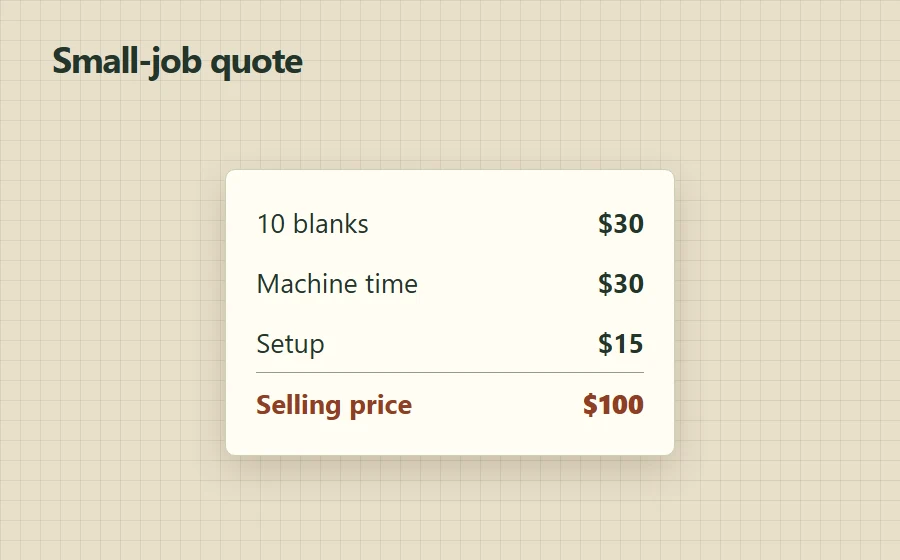
Suppose I need ten blanks at $3 each. That is $30 in materials. At a $60 hourly machine rate, a 30-minute run adds $30. Add $15 for one-time costs and the example job costs $75. I enter those pieces in the Engraving Price Calculator and check that the total matches my own rough math.
If I am charging labor separately, I check whether the machine rate already includes an operator. It’s easy to count the same minutes twice by adding a labor rate to a machine rate that already includes it. Conversely, a bare machine rate does not cover the time spent cleaning, packing or answering a customer’s art revisions.
Decide whether you mean markup or margin
At $75 in cost, a 25% markup adds $18.75 for a selling price of $93.75. A 25% margin means profit is a quarter of the selling price, so the no-fee calculation is $75 ÷ 0.75 = $100. Same percentage, different number. I write down which rule I am using before I compare it to earlier jobs.
If there’s a percentage selling fee, I account for it before I settle on the price. On a $100 sale, a 5% fee leaves $95 before job costs. That turns the apparent $25 on this sample order into $20. I use the fee fields in the calculator instead of hoping a round price will cover it.
Check quantity changes on their own merits
I estimate machine time from cycles, rather than simply doubling the 10-piece quote for an order of 20. If the jig holds six, 10 pieces need two cycles and 20 need four. If I can fit more on the bed safely, the relationship may change. The Production Time Calculator keeps setup, handling and machine time separate so I can substitute a timed run.
Finally I export a customer estimate and review what it leaves out. If shipping or tax needs to appear, I include it in the order quote separately. Before sending a price, I want to be able to explain how I got it and what would change if the job changes.
Write down the assumptions that can change the price
I separate a straightforward repeat job from a first order with uncertain artwork or material. For a new design I allow time to review the artwork, make a sample and handle the expected revisions. For a repeat I can replace those allowances with recorded time. I still verify the blank cost when I reorder stock. A number inherited from an old quote can quietly erase the margin on many small pieces.
For the example above, one ruined $3 blank would bring material to $33 and total cost to $78 before any extra machine or labor time. With a no-fee 25% margin, $78 ÷ 0.75 gives $104. I prefer explicitly adding expected waste instead of hoping the profit line will absorb it without noticing.